
Vulnerable Playground
Azure/Entra playground to practice enumeration and exploitation
There isn’t much documentation on how to create vulnerable Azure/Entra environments. The only experience I’ve had with Azure/Entra was helping maintain and configure client tenants at an MSP, and being the admin of our own tenant at my last company. I can’t think of a time when I was asked to turn on misconfigurations on purpose. From afar, I’ve always admired security content creators for being able to essentially, in my mind, reverse-engineer a hardened environment into something vulnerable to specific attack paths or exploits. So, this was my first time putting a vulnerable Azure/Entra tenant together. I decided to do it all in PowerShell rather than try to piece something together on a canvas, a mindmap, or just from the hip. I’ll attach both PowerShell scripts I used, for anyone interested in creating their own. As a huge fan of the Metroid universe, all users, groups, applications, etc. are from the franchise. I thought it could be helpful to partially share my experience on building a vulnerable environment with PowerShell and a snippet of the graph behind it in BloodHound. **Disclaimer: I had claude code pull together my whole PowerShell session into a script for convenience, which is shared at the end of the post… Otherwise, it was A LOT of red. :)
So, how I approached the PowerShell method was by using BloodHound edges as my source of truth to determine what had permissions or rights over another object. With that in mind, the easy and fun part came first: figuring out how many users, groups, roles, and apps I needed, then putting names to each of them. So, of course, I pulled up the Metroid Universe wiki and started going HAM. To avoid overcomplicating everything, I had claude code create a table mapping each BloodHound edge to its Graph permission and the affected service principal.
Table of Service Principal -> Graph/BloodHound Edge (snippet):
| Service principal | Graph permission | BloodHound edge | What it buys you |
|---|---|---|---|
| Chozo-Memory-Core | RoleManagement.ReadWrite.Directory |
AZMGGrantRole |
Grant any directory role to anyone — including Global Administrator. The nuclear option. |
| Aurora-Unit-242 | AppRoleAssignment.ReadWrite.All |
AZMGGrantAppRoles |
Grant Graph app-roles to any SP, including itself — bootstrap straight up to RoleManagement.ReadWrite.Directory. |
| Metroid-Incubator | Application.ReadWrite.All |
AZMGAddSecret / AZMGAddOwner |
Add credentials (or owners) to any app — take over a more privileged SP. |
| Norfair-Lavafall | GroupMember.ReadWrite.All |
AZMGAddMember |
Add members to any group, role-assignable ones included. |
| Ridley-Cybernetics | Directory.ReadWrite.All |
(broad directory write) | The kitchen-sink grant; BloodHound treats it as highly privileged. |
Now that I had a direction and some inspiration from Sean Metcalf’s Bsides Presentation I started slamming some MsGraph commands using some tooling I’d built back in my previous position for managing Azure tenants. And, of course, I struggled in the very beginning just to get MsGraph to connect to my environment. Why, you may ask? Well, I was too excited after getting it created and proceeded to test some basic MsGraph commands, which all failed. The root cause? Well, the environment took a good 3 hours to fully provision, and I hadn’t accounted for that. I just spun it up and expected everything to work immediately… thanks, Microsoft minutes!
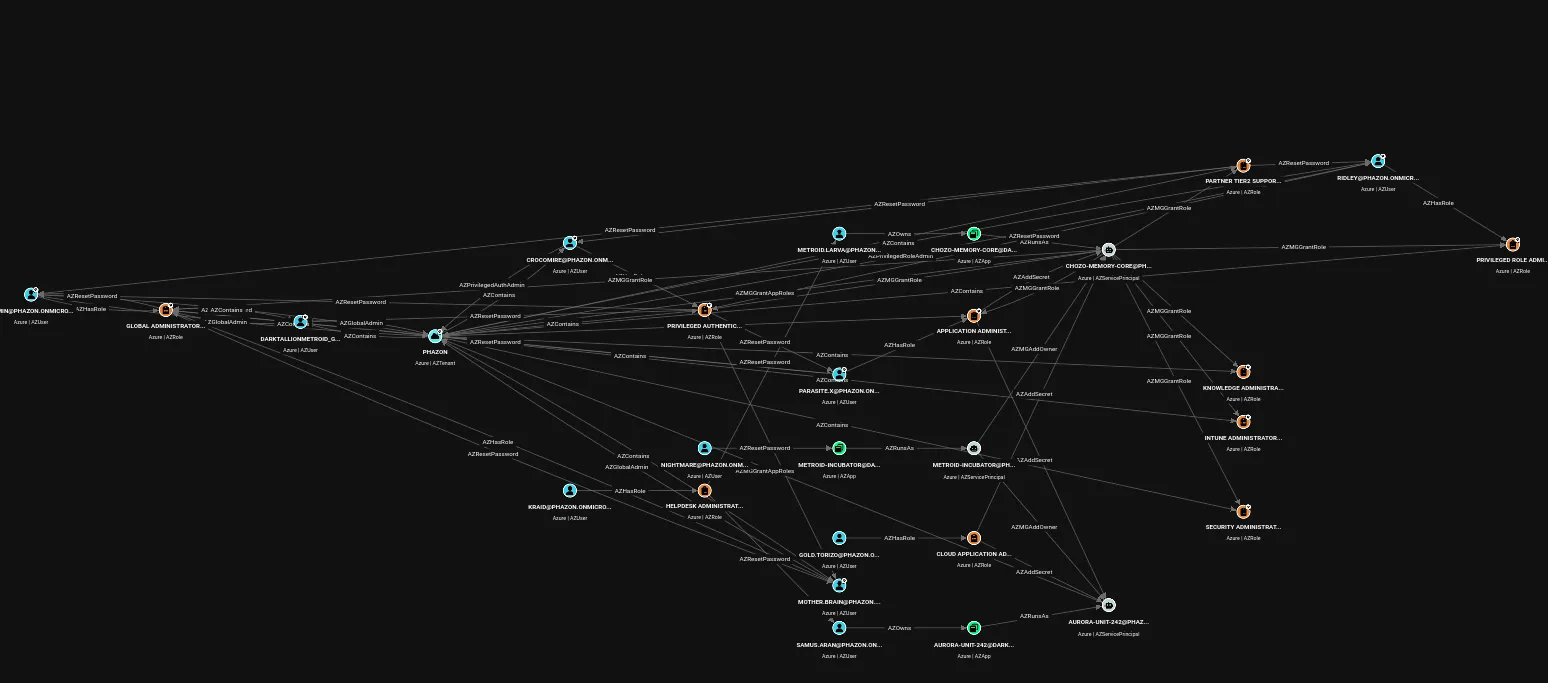
I’ve learned from other security practitioners and a lot of IT administrators to KISS (Keep It Simple, Stupid). So, with that mentality in mind, I approached the setup in 8 steps. And after two hours of struggling, I was able to get my users, groups, roles, and apps into the environment. Here’s what the whole environment looks like in BloodHound after the second deployment script (see below).
BloodHound Graph:
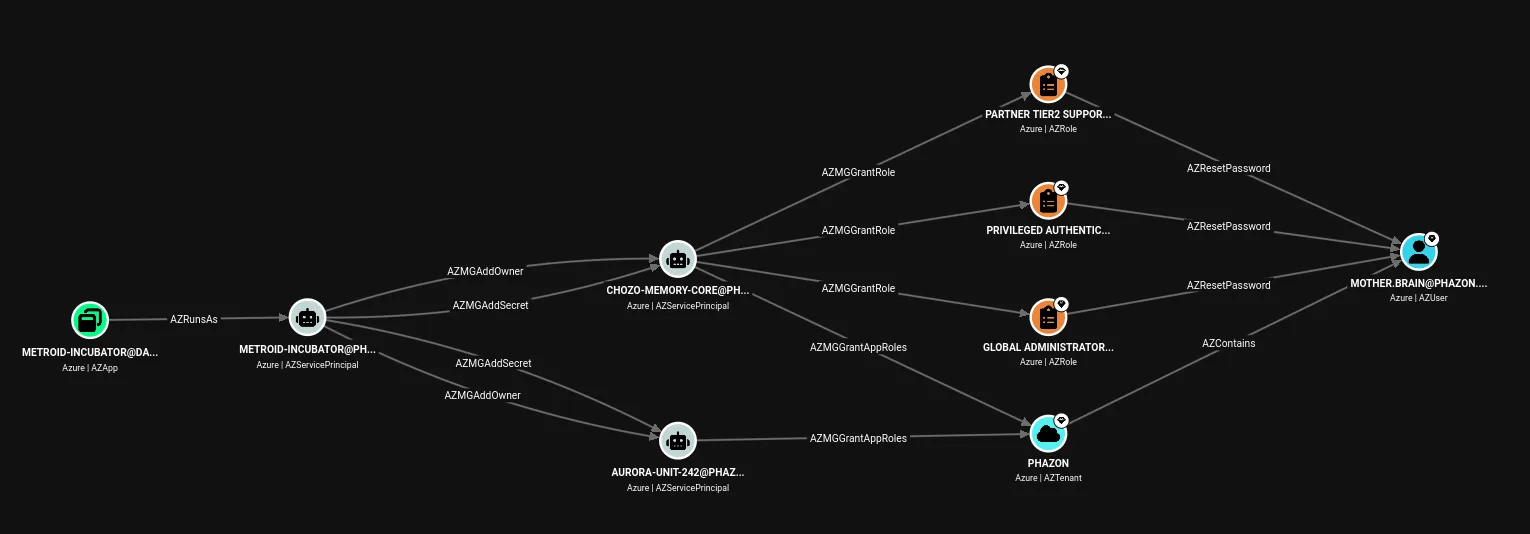
ShortestPath
Sample Attack Path
The second PowerShell script that adds additional edges was something I thought of after hearing an internal meeting last week about idempotent code. Truth be told, I’m only a few days old on experiencing that word in the tech world. After some further research into some documentation, I was surprised to know that the concept was rather easy and foundational.. I just had never heard the term used before. But, I was surprised to know how much it mattered in code and environments, especially test environments. Essentially, idempotent code is that it can run or loop as many times as possible and it will leave the tenant in the same state even after running the script. Pretty simple concept, but never heard of the terminology before (I don’t have a developer background).
Code Snippet:
foreach ($e in $NewRoleEdges) {
    $prinId = Get-UserId $e.Upn
    $rid    = Get-RoleDefinitionId $e.Role
    $f      = "roleDefinitionId eq '$rid' and principalId eq '$prinId'"
    $existing = (Invoke-Graph GET ".../roleAssignments?`$filter=$([uri]::EscapeDataString($f))").value
    if ($existing) { Write-Host "    = $($e.Role) -> $($e.Upn) already present, skipping"; continue }
    $body = @{ principalId = $prinId; roleDefinitionId = $rid; directoryScopeId = '/' }
    Invoke-Graph POST ".../roleAssignments" $body | Out-Null
    Write-Host "    + $($e.Role) -> $($e.Upn)"
}
The basics of it is that it checks whether the role assignment already exists before it tries to add anything. If it’s already there, the script skips it and prints an =; if it’s missing, that’s the only time it actually creates it, and prints a +. That’s the whole trick! I can run it once or ten times and the tenant lands in the exact same state either way, no duplicate assignments and no errors on the second pass. For a test environment, this is exactly what I want.. reproducibility. I’m building a tool that exploits BloodHound findings and I need to be able to rollback or re-execute my deployment for validating exploitation. I’ll be sharing more about the tool in later posts, which I’m super excited to get into the nitty-gritty about. However, that’s for another time. Over the next few weeks, I’ll continue to be fine-tuning this environment and will more than likely start adding some Azure resources and a trial P2 license so that I can practice a few more BloodHound edges because some edges have a prerequiste. Anyways, if you made it this far, thanks for reading! Catch you in the next one!
Deployment Script
[CmdletBinding()]
param(
    [Parameter(Mandatory)]
    [string]$TenantDomain,

    [string]$CredentialOutFile = ".\Phazon-Lab-Credentials.csv",

    [switch]$SkipRoleAssignableGroups,
    [switch]$DisableSecurityDefaults,
    [switch]$Destroy
)

$ErrorActionPreference = 'Stop'
$GraphBase  = "https://graph.microsoft.com/v1.0"
$GraphAppId = "00000003-0000-0000-c000-000000000000"

$LabUsers = @(
    @{ Key='motherbrain';  Upn='mother.brain';  Name='Mother Brain'   }
    @{ Key='ridley';       Upn='ridley';        Name='Ridley'         }
    @{ Key='kraid';        Upn='kraid';         Name='Kraid'          }
    @{ Key='parasitex';    Upn='parasite.x';    Name='X Parasite'     }
    @{ Key='larva';        Upn='metroid.larva'; Name='Metroid Larva'  }
    @{ Key='nightmare';    Upn='nightmare';     Name='Nightmare'      }
    @{ Key='phantoon';     Upn='phantoon';      Name='Phantoon'       }
    @{ Key='samus';        Upn='samus.aran';    Name='Samus Aran'     }
    @{ Key='crocomire';    Upn='crocomire';     Name='Crocomire'      }
    @{ Key='goldtorizo';   Upn='gold.torizo';   Name='Gold Torizo'    }
    @{ Key='draygon';      Upn='draygon';       Name='Draygon'        }
)

$LabGroups = @(
    @{ Key='pirate-command'; Name='Space Pirate Command';  RoleAssignable=$true  }
    @{ Key='zebes-guardians';Name='Zebes Guardians';       RoleAssignable=$true  }
    @{ Key='chozo-statues';  Name='Chozo Statues';         RoleAssignable=$false }
    @{ Key='pirate-troopers';Name='Pirate Troopers';       RoleAssignable=$false }
)

$LabApps = @(
    @{ Key='chozo-core';   Name='Chozo-Memory-Core';  GraphPerm='RoleManagement.ReadWrite.Directory' }
    @{ Key='aurora-242';   Name='Aurora-Unit-242';    GraphPerm='AppRoleAssignment.ReadWrite.All'     }
    @{ Key='incubator';    Name='Metroid-Incubator';  GraphPerm='Application.ReadWrite.All'           }
    @{ Key='norfair';      Name='Norfair-Lavafall';   GraphPerm='GroupMember.ReadWrite.All'           }
    @{ Key='ridley-cyber'; Name='Ridley-Cybernetics'; GraphPerm='Directory.ReadWrite.All'             }
)

$RoleAssignments = @(
    @{ Role='Global Administrator';                   Target='motherbrain';     Type='user'  }
    @{ Role='Privileged Authentication Administrator';Target='crocomire';       Type='user'  }
    @{ Role='Application Administrator';              Target='parasitex';       Type='user'  }
    @{ Role='Cloud Application Administrator';        Target='goldtorizo';      Type='user'  }
    @{ Role='Helpdesk Administrator';                Target='kraid';           Type='user'  }
    @{ Role='Privileged Role Administrator';         Target='pirate-command';  Type='group' }
    @{ Role='Privileged Authentication Administrator';Target='zebes-guardians';Type='group' }
)

$AppOwners = @(
    @{ App='chozo-core';   Owner='larva'      }
    @{ App='aurora-242';   Owner='samus'      }
    @{ App='incubator';    Owner='nightmare'  }
    @{ App='norfair';      Owner='draygon'    }
    @{ App='ridley-cyber'; Owner='goldtorizo' }
)

$GroupOwners = @(
    @{ Group='pirate-command';  Owner='ridley'   }
    @{ Group='zebes-guardians'; Owner='phantoon' }
)

$GroupMembers = @(
    @{ Group='chozo-statues'; Member='kraid';           Type='user'  }
    @{ Group='chozo-statues'; Member='ridley';          Type='user'  }
    @{ Group='chozo-statues'; Member='pirate-troopers'; Type='group' }
)

function Invoke-Graph {
    param([string]$Method,[string]$Uri,[object]$Body)
    $params = @{ Method = $Method; Uri = $Uri }
    if ($PSBoundParameters.ContainsKey('Body') -and $null -ne $Body) {
        $params.Body        = ($Body | ConvertTo-Json -Depth 10 -Compress)
        $params.ContentType = 'application/json'
    }
    Invoke-MgGraphRequest @params
}

function New-LabPassword {

    $u='ABCDEFGHJKLMNPQRSTUVWXYZ'; $l='abcdefghijkmnpqrstuvwxyz'
    $d='23456789'; $s='!@#$%^&*-_=+'
    $all = ($u+$l+$d+$s).ToCharArray()
    $pw  = @($u[(Get-Random -Max $u.Length)],$l[(Get-Random -Max $l.Length)],
             $d[(Get-Random -Max $d.Length)],$s[(Get-Random -Max $s.Length)])
    1..16 | ForEach-Object { $pw += $all[(Get-Random -Max $all.Length)] }
    -join ($pw | Sort-Object {Get-Random})
}

function Get-RoleDefinitionId {
    param([string]$DisplayName)
    $enc = [uri]::EscapeDataString($DisplayName)
    $r = Invoke-Graph GET "$GraphBase/roleManagement/directory/roleDefinitions?`$filter=displayName eq '$enc'"
    if (-not $r.value) { throw "Role definition '$DisplayName' not found." }
    $r.value[0].id
}

function Get-GraphAppRoleId {
    param([string]$Value)
    if (-not $script:GraphSp) {
        $script:GraphSp = (Invoke-Graph GET "$GraphBase/servicePrincipals?`$filter=appId eq '$GraphAppId'").value[0]
    }
    $role = $script:GraphSp.appRoles | Where-Object { $_.value -eq $Value -and $_.allowedMemberTypes -contains 'Application' }
    if (-not $role) { throw "Graph app role '$Value' not found." }
    [pscustomobject]@{ AppRoleId = $role.id; ResourceId = $script:GraphSp.id }
}

$scopes = @(
    'Directory.ReadWrite.All','RoleManagement.ReadWrite.Directory',
    'Application.ReadWrite.All','Group.ReadWrite.All','User.ReadWrite.All',
    'AppRoleAssignment.ReadWrite.All'
)
if ($DisableSecurityDefaults) { $scopes += 'Policy.ReadWrite.SecurityDefaults' }

Write-Host "Connecting to Microsoft Graph (sign in as a Global Admin of $TenantDomain)..." -ForegroundColor Cyan
Connect-MgGraph -Scopes $scopes -NoWelcome

if ($Destroy) {
    Write-Host "`n*** TEARDOWN: removing the Phazon lab ***`n" -ForegroundColor Yellow

    foreach ($a in $LabApps) {
        $app = (Invoke-Graph GET "$GraphBase/applications?`$filter=displayName eq '$($a.Name)'").value
        foreach ($x in $app) {
            try { Invoke-Graph DELETE "$GraphBase/applications/$($x.id)" | Out-Null
                  Write-Host "  removed app   $($a.Name)" } catch {}
        }
    }
    foreach ($g in $LabGroups) {
        $grp = (Invoke-Graph GET "$GraphBase/groups?`$filter=displayName eq '$($g.Name)'").value
        foreach ($x in $grp) {
            try { Invoke-Graph DELETE "$GraphBase/groups/$($x.id)" | Out-Null
                  Write-Host "  removed group $($g.Name)" } catch {}
        }
    }
    foreach ($u in $LabUsers) {
        $upn = "$($u.Upn)@$TenantDomain"
        try { Invoke-Graph DELETE "$GraphBase/users/$upn" | Out-Null
              Write-Host "  removed user  $upn" } catch {}
    }
    Write-Host "`nTeardown complete. (Deleted objects sit in the recycle bin ~30 days.)" -ForegroundColor Green
    Disconnect-MgGraph | Out-Null
    return
}

$ids   = @{}
$creds = @()

Write-Host "`n[1/8] Creating users..." -ForegroundColor Cyan
foreach ($u in $LabUsers) {
    $upn = "$($u.Upn)@$TenantDomain"
    $pw  = New-LabPassword
    $body = @{
        accountEnabled    = $true
        displayName       = $u.Name
        mailNickname      = ($u.Upn -replace '\.','')
        userPrincipalName = $upn
        passwordProfile   = @{ forceChangePasswordNextSignIn = $false; password = $pw }
    }
    $new = Invoke-Graph POST "$GraphBase/users" $body
    $ids[$u.Key] = $new.id
    $creds += [pscustomobject]@{ DisplayName=$u.Name; UserPrincipalName=$upn; Password=$pw }
    Write-Host "    + $($u.Name)  ($upn)"
}

Write-Host "`n[2/8] Creating groups..." -ForegroundColor Cyan
foreach ($g in $LabGroups) {
    $wantRA = $g.RoleAssignable -and -not $SkipRoleAssignableGroups
    $body = @{
        displayName     = $g.Name
        mailEnabled     = $false
        mailNickname    = ($g.Key -replace '[^a-zA-Z0-9]','')
        securityEnabled = $true
    }
    if ($wantRA) { $body.isAssignableToRole = $true }
    try {
        $new = Invoke-Graph POST "$GraphBase/groups" $body
        $ids[$g.Key] = $new.id
        $tag = if ($wantRA) { '[role-assignable]' } else { '' }
        Write-Host "    + $($g.Name) $tag"
    } catch {
        if ($wantRA) {
            Write-Warning "    Could not create role-assignable group '$($g.Name)' (needs Entra ID P1/P2 -- Can use a trial P2 license for 30 days.. otherwise skip). Creating as a normal group; its role-based paths will be skipped."
            $body.Remove('isAssignableToRole')
            $new = Invoke-Graph POST "$GraphBase/groups" $body
            $ids[$g.Key] = $new.id
            $g.RoleAssignable = $false
        } else { throw }
    }
}

Write-Host "`n[3/8] Creating applications + service principals (App Instance Lock OFF)..." -ForegroundColor Cyan
foreach ($a in $LabApps) {
    $appBody = @{
        displayName    = $a.Name
        signInAudience = 'AzureADMyOrg'
        servicePrincipalLockConfiguration = @{ isEnabled = $false }
    }
    $app = Invoke-Graph POST "$GraphBase/applications" $appBody
    $sp  = Invoke-Graph POST "$GraphBase/servicePrincipals" @{ appId = $app.appId }
    $ids["app:$($a.Key)"] = $app.id
    $ids["sp:$($a.Key)"]  = $sp.id
    Write-Host "    + $($a.Name)  (app + SP)"
}

Write-Host "`n[4/8] Granting MS Graph application permissions to service principals..." -ForegroundColor Cyan
foreach ($a in $LabApps) {
    $role = Get-GraphAppRoleId -Value $a.GraphPerm
    $body = @{ principalId = $ids["sp:$($a.Key)"]; resourceId = $role.ResourceId; appRoleId = $role.AppRoleId }
    Invoke-Graph POST "$GraphBase/servicePrincipals/$($ids["sp:$($a.Key)"])/appRoleAssignments" $body | Out-Null
    Write-Host "    + $($a.Name) -> $($a.GraphPerm)"
}

Write-Host "`n[5/8] Assigning Entra directory roles..." -ForegroundColor Cyan
foreach ($r in $RoleAssignments) {
    if ($r.Type -eq 'group') {
        $g = $LabGroups | Where-Object Key -eq $r.Target
        if (-not $g.RoleAssignable) { Write-Warning "    skip '$($r.Role)' -> '$($r.Target)' (group not role-assignable)"; continue }
    }
    if (-not $ids.ContainsKey($r.Target)) { Write-Warning "    skip '$($r.Role)' (missing $($r.Target))"; continue }
    $rid  = Get-RoleDefinitionId -DisplayName $r.Role
    $body = @{ principalId = $ids[$r.Target]; roleDefinitionId = $rid; directoryScopeId = '/' }
    Invoke-Graph POST "$GraphBase/roleManagement/directory/roleAssignments" $body | Out-Null
    Write-Host "    + $($r.Role) -> $($r.Target)"
}

Write-Host "`n[6/8] Setting application owners (AZOwns -> AZAddSecret)..." -ForegroundColor Cyan
foreach ($o in $AppOwners) {
    $ref = @{ '@odata.id' = "$GraphBase/directoryObjects/$($ids[$o.Owner])" }
    Invoke-Graph POST ("$GraphBase/applications/$($ids["app:$($o.App)"])/owners/" + '$ref') $ref | Out-Null
    Write-Host "    + $($o.Owner) owns $($o.App)"
}

Write-Host "`n[7/8] Setting group owners (delegated owner of role-assignable group)..." -ForegroundColor Cyan
foreach ($o in $GroupOwners) {
    $ref = @{ '@odata.id' = "$GraphBase/directoryObjects/$($ids[$o.Owner])" }
    Invoke-Graph POST ("$GraphBase/groups/$($ids[$o.Group])/owners/" + '$ref') $ref | Out-Null
    Write-Host "    + $($o.Owner) owns group $($o.Group)"
}

Write-Host "`n[8/8] Adding regular-group memberships (structural)..." -ForegroundColor Cyan
foreach ($m in $GroupMembers) {
    $ref = @{ '@odata.id' = "$GraphBase/directoryObjects/$($ids[$m.Member])" }
    Invoke-Graph POST ("$GraphBase/groups/$($ids[$m.Group])/members/" + '$ref') $ref | Out-Null
    Write-Host "    + $($m.Member) is member of $($m.Group)"
}

if ($DisableSecurityDefaults) {
    Write-Host "`n[+] Disabling Security Defaults (enables password auth for the lab)..." -ForegroundColor Cyan
    try {
        Invoke-Graph PATCH "$GraphBase/policies/identitySecurityDefaultsEnforcementPolicy" @{ isEnabled = $false } | Out-Null
        Write-Host "    Security Defaults disabled."
    } catch { Write-Warning "    Could not disable Security Defaults: $($_.Exception.Message)" }
}

$creds | Export-Csv -Path $CredentialOutFile -NoTypeInformation -Encoding UTF8
Write-Host "`n=====================================================================" -ForegroundColor Green
Write-Host " Phazon lab deployed. Crown jewel = Mother Brain (Global Administrator)." -ForegroundColor Green
Write-Host " Credentials written to: $CredentialOutFile"                              -ForegroundColor Green
Write-Host "=====================================================================`n"  -ForegroundColor Green

Disconnect-MgGraph | Out-Null
Adding Additional AzureHound Edges
[CmdletBinding()]
param(
    [Parameter(Mandatory)][string]$TenantDomain,
    [switch]$Rollback
)

$ErrorActionPreference = 'Stop'
$GraphBase  = "https://graph.microsoft.com/v1.0"

$FicAppName = 'METROID-PRIME-CORE'
$FicName    = 'phazon-gh-trust'

$NewRoleEdges = @(
    @{ Upn='ridley';    Role='Privileged Role Administrator' }
    @{ Upn='draygon';   Role='Groups Administrator'          }
    @{ Upn='nightmare'; Role='User Administrator'            }
)

function Invoke-Graph {
    param([string]$Method,[string]$Uri,[object]$Body)
    $params = @{ Method = $Method; Uri = $Uri }
    if ($PSBoundParameters.ContainsKey('Body') -and $null -ne $Body) {
        $params.Body        = ($Body | ConvertTo-Json -Depth 10 -Compress)
        $params.ContentType = 'application/json'
    }
    Invoke-MgGraphRequest @params
}
function Get-RoleDefinitionId {
    param([string]$DisplayName)
    $enc = [uri]::EscapeDataString($DisplayName)
    $r = Invoke-Graph GET "$GraphBase/roleManagement/directory/roleDefinitions?`$filter=displayName eq '$enc'"
    if (-not $r.value) { throw "Role definition '$DisplayName' not found." }
    $r.value[0].id
}
function Get-UserId {
    param([string]$LocalPart)
    $upn = "$LocalPart@$TenantDomain"
    $r = Invoke-Graph GET "$GraphBase/users/$upn"
    $r.id
}
function Get-AppByName {
    param([string]$Name)
    (Invoke-Graph GET "$GraphBase/applications?`$filter=displayName eq '$Name'").value
}

$scopes = @('RoleManagement.ReadWrite.Directory','Application.ReadWrite.All',
            'User.Read.All','Directory.Read.All')
Write-Host "Connecting to Microsoft Graph (sign in as a Global Admin of $TenantDomain)..." -ForegroundColor Cyan

Connect-MgGraph -Scopes $scopes -UseDeviceCode -NoWelcome

if ($Rollback) {
    Write-Host "`n*** ROLLBACK ***`n" -ForegroundColor Yellow

    foreach ($e in $NewRoleEdges) {
        try {
            $prinId = Get-UserId $e.Upn
            $rid    = Get-RoleDefinitionId $e.Role
            $f      = "roleDefinitionId eq '$rid' and principalId eq '$prinId'"
            $a   = (Invoke-Graph GET "$GraphBase/roleManagement/directory/roleAssignments?`$filter=$([uri]::EscapeDataString($f))").value
            foreach ($x in $a) {
                Invoke-Graph DELETE "$GraphBase/roleManagement/directory/roleAssignments/$($x.id)" | Out-Null
                Write-Host "  removed $($e.Role) -> $($e.Upn)"
            }
        } catch { Write-Warning "  could not roll back $($e.Role) -> $($e.Upn): $($_.Exception.Message)" }
    }
    foreach ($app in (Get-AppByName $FicAppName)) {
        Invoke-Graph DELETE "$GraphBase/applications/$($app.id)" | Out-Null
        Write-Host "  removed app $FicAppName"
    }
    Write-Host "`nRollback complete." -ForegroundColor Green
    Disconnect-MgGraph | Out-Null
    return
}

Write-Host "`n[1/2] Adding directory-role edges ..." -ForegroundColor Cyan
foreach ($e in $NewRoleEdges) {
    $prinId = Get-UserId $e.Upn
    $rid    = Get-RoleDefinitionId $e.Role
    $f      = "roleDefinitionId eq '$rid' and principalId eq '$prinId'"
    $existing = (Invoke-Graph GET "$GraphBase/roleManagement/directory/roleAssignments?`$filter=$([uri]::EscapeDataString($f))").value
    if ($existing) { Write-Host "    = $($e.Role) -> $($e.Upn) already present, skipping"; continue }
    $body = @{ principalId = $prinId; roleDefinitionId = $rid; directoryScopeId = '/' }
    Invoke-Graph POST "$GraphBase/roleManagement/directory/roleAssignments" $body | Out-Null
    Write-Host "    + $($e.Role) -> $($e.Upn)"
}

Write-Host "`n[2/2] Federated identity credential app (AZAuthenticatesTo)..." -ForegroundColor Cyan
$app = Get-AppByName $FicAppName | Select-Object -First 1
if (-not $app) {
    $app = Invoke-Graph POST "$GraphBase/applications" @{
        displayName    = $FicAppName
        signInAudience = 'AzureADMyOrg'
        servicePrincipalLockConfiguration = @{ isEnabled = $false }
    }
    Write-Host "    + created app $FicAppName"

    Start-Sleep -Seconds 15
} else {
    Write-Host "    = app $FicAppName already exists"
}

$spExists = (Invoke-Graph GET "$GraphBase/servicePrincipals?`$filter=appId eq '$($app.appId)'").value
if (-not $spExists) {
    Invoke-Graph POST "$GraphBase/servicePrincipals" @{ appId = $app.appId } | Out-Null
    Write-Host "    + created service principal"
} else { Write-Host "    = service principal already exists" }

$fics = (Invoke-Graph GET "$GraphBase/applications/$($app.id)/federatedIdentityCredentials").value
if (-not ($fics | Where-Object name -eq $FicName)) {
    $body = @{
        name      = $FicName
        issuer    = 'https://token.actions.githubusercontent.com'
        subject   = 'repo:phazon-labs/metroid-prime:ref:refs/heads/main'
        audiences = @('api://AzureADTokenExchange')
    }
    for ($i=1; $i -le 5; $i++) {
        try {
            Invoke-Graph POST "$GraphBase/applications/$($app.id)/federatedIdentityCredentials" $body | Out-Null
            Write-Host "    + added federated identity credential '$FicName'"
            break
        } catch {
            if ($i -eq 5) { throw }
            Write-Warning "    app not replicated yet, retry $i/5..."; Start-Sleep -Seconds 10
        }
    }
} else { Write-Host "    = FIC '$FicName' already present" }

Disconnect-MgGraph | Out-Null